

-
18 АПР 20120
-
17 АПР 20120
-
16 АПР 20120
HTML5 Placeholder Attribute

Ранее я уже писал о плейсхолдерах. Нормальные браузеры поддерживают
. Вот костыль на jquery который решает проблему для недобраузеров:<input type='text' name='email' placeholder='Email Address'/><script>
// placeholder polyfill
$(document).ready(function(){
function add() {
if($(this).val() == ''){
$(this).val($(this).attr('placeholder')).addClass('placeholder');
}
}
function remove() {
if($(this).val() == $(this).attr('placeholder')){
$(this).val('').removeClass('placeholder');
}
}
// Create a dummy element for feature detection
if (!('placeholder' in $('<input>')[0])) {
// Select the elements that have a placeholder attribute
$('input[placeholder], textarea[placeholder]').blur(add).focus(remove).each(add);
// Remove the placeholder text before the form is submitted
$('form').submit(function(){
$(this).find('input[placeholder], textarea[placeholder]').each(remove);
});
}
});
</script>
А стили на них вешаются так:::-webkit-input-placeholder { color:#999; }
:-moz-placeholder { color:#999; }
:-ms-input-placeholder { color:#999; } -
14 АПР 20120
Делаем форму как на картинке jQuery
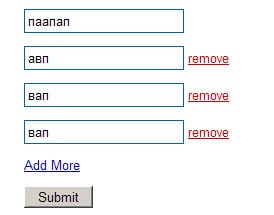
HTML<form method="post" action="clonesubmit.php">
<p class="clone"> <input type="text" name="hobby[]" class='input'/></p>
<p><a href="#" class="add" rel=".clone">Add More</a></p>
<input type="submit" value=" Submit " />
</form>
Подключаем плагин relCopy.js http://www.andresvidal.com/labs/relcopy.html
Добавляем js который добавляет линк на удаление нового поля:$(function(){
var removeLink = ' <a class="remove" href="#" onclick="$(this).parent().slideUp(function(){ $(this).remove() }); return false">remove</a>';
$('a.add').relCopy({ append: removeLink});
});
Ну и на clonesubmit.php вешаем обработчик hobby[] -
13 АПР 20120
Делаем бокс со счетчиком символов и визуальным баром на jQuery
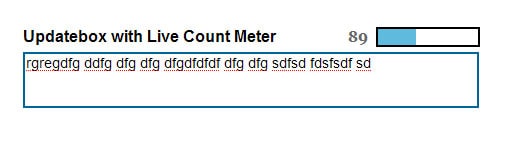
JS
 $(document).ready(function()
{
$("#contentbox").keyup(function()
{
var box=$(this).val();
var main = box.length *100;
var value= (main / 145);
var count= 145 - box.length;

if(box.length <= 145)
{
$('#count').html(count);
$('#bar').animate(
{
"width": value+'%',


}, 1);
}
else
{
alert('Full');
}
return false;
});

});
CSSbody
{
font-family:Arial, Helvetica, sans-serif;
}
#contentbox
{
width:450px; height:50px;
border:solid 2px #006699;
font-family:Arial, Helvetica, sans-serif;
font-size:14px;
}
#button
{
background-color:#006699;
color:#ffffff;
font-size:13px;
font-weight:bold;
padding:4px;
}
#cancel
{
background-color:#dedede;
color:#000;
font-size:13px;
padding:4px;
margin-left:10px;
}
#button_block
{
display:none;
}
#bar
{
background-color:#5fbbde;
width:0px;
height:16px;
}
#barbox
{
float:right; height:16px; background-color:#FFFFFF; width:100px; border:solid 2px #000; margin-right:3px;-webkit-border-radius:5px;-moz-border-radius:5px;
}
#count
{
float:right; margin-right:8px; font-family:'Georgia', Times New Roman, Times, serif; font-size:16px; font-weight:bold; color:#666666
}
HTML<div id="barbox"><div id="bar"></div></div><div id="count">145</div>
</div>
<textarea id="contentbox"></textarea>
<div id="button_block">
<input type="submit" id="button" value=" Share "/><input type="submit" id='cancel' value=" cancel" />
</div> -
11 АПР 20120
FullCalendar от Adam Shaw
|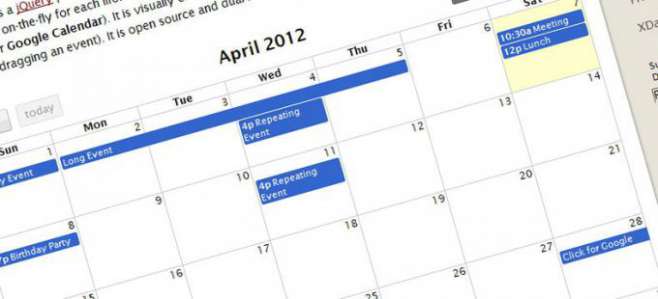
FullCalendar is a jQuery plugin that provides a full-sized, drag & drop calendar like the one below. It uses AJAX to fetch events on-the-fly for each month and is easily configured to use your own feed format (an extension is provided for Google Calendar). It is visually customizable and exposes hooks for user-triggered events (like clicking or dragging an event). It is open source and dual licensed under the MIT or GPL Version 2 licenses.
Ссылка: http://arshaw.com/fullcalendar/ -
26 МАРТ 20120
Сниппеты на jquery

Как узнать, имеется ли на странице элементif ( $('#myDiv').length ) { /* что-то делаем */}
Как запретить/разрешить элемент (disable/enable)$("#x").attr("disabled","disabled");
$("#x").removeAttr("disabled");
Как сделать выбор/отмену выбора чекбокса (check/uncheck)$("#x").attr("checked", "checked");
$("#x").attr("checked","");
Как получить значение выбранного элемента в селекте<select id="sel">
<option value="1">vremenno</option>
<option value="2">net</option>
</select>
$("select#sel").val();
$("#sel option:selected").text();
Как выбрать элементы, у которых в ID есть спецсимволы (".", "[", и т.п.)$("#some.id") // не работает
$("#some\.id") // работает
Как определить, прописан ли у элемента класс (эта функция появилась в jQuery 1.2)$('#something').hasClass("someClass")
Плавное изменение цвета$(document).ready( function() {
$(".mainMenu a, .articleTitle a").mouseover( function() {
$(this).animate({color: "#cc4e4e"}, {queue:false, duration:250 });
}).mouseout( function() {
$(this).animate({color: "#0e8db7"}, { queue:false, duration:350});
});
});
Выбрать все чекбоксы конкретного объектаfunction checkall(context){
$("#"+context).find("input[@type$='checkbox']").each(function(){
this.checked = checked;
});
}
Количество выбранных элементов$('element').size();
Состояние радиобаттонаvar var_name = $("input[@name='radio_name']:checked").val();
Перехват изменения размера окнаfunction doSomething() {
alert("Я закончил изменение размера!");
};
var resizeTimer = null;
$(window).bind('resize', function() {
if (resizeTimer) clearTimeout(resizeTimer);
resizeTimer = setTimeout(doSomething, 100);
});
Расположение объекта по центру экранаjQuery.fn.center = function()
{
var w = $(window);
this.css("position","absolute");
this.css("top",(w.height()-this.height())/2+w.scrollTop() + "px");
this.css("left",(w.width()-this.width())/2+w.scrollLeft() + "px");
return this;
}
Замена текста внутри элемента, используя регулярные выражения
Полезно, например при замене «скрыть» - «показать»jQuery.fn.toggleText = function(a,b)
{
return this.html(this.html().replace(new RegExp("("+a+"|"+b+")"),
function(x){return(x==a)?b:a;}));
}
Запуск события resize после задержки
Задержка нужна по той причине, что событие resize() постоянно, пока юзер изменяет размер окна. А с использование этой функции, ресайз будет запускаться только через некоторое количество мс после того, как юзер прекратит изменять размер экрана.jQuery.fn.resizeComplete = function(fn, ms)
{
var timer = null;
this.resize(function()
{
if (timer)
{
clearTimeout(timer);
}
timer = setTimeout(fn,ms);
});
} -
08 МАРТ 20120
jQuery contextMenu
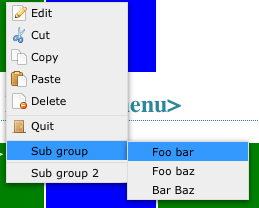
Скрипт для создания контекстного меню
Оф сайт: http://medialize.github.com/jQuery-contextMenu/index.html

Категории:
Оставить на заметку в: